-
Shop
- Adidas
- Advanced Technologies
- AI Skills Mastery 2026 Collection
- Best-Sellers
- Calvin Klein
- Car Accessories
- Confidence
- Dating & Social Skills
- Digital Resources
- AI & Technology
- AI Skills
- Beauty
- Budgeting & Saving
- Car Buying & Ownership
- Cozy Feast Collection
- Electronics & Technology
- Entrepreneurship & Business Growth
- Financial Education
- Financial Independence
- Financial Mindset & Psychology
- Goal Setting
- Hobbies
- Home Styling & Organization
- Kitchen & Recipes
- Leadership
- Mindset
- Online Business
- Parenting & Child Development
- Personal Style & Fashion
- Pet Lifestyle & Wellness
- Positive Thinking
- Sleep Improvement
- Stress Management & Relaxation
- Travel Planning
- Yoga & Fitness
- Yoga & Mind-Body Practices
- Education & Learning
- Family & Parenting
- Fashion
- Alexander McQueen
- Bags
- Bags & Wallets
- Balenciaga
- Belts
- Blazers
- Bottega Veneta
- Brunello Cucinelli
- Burberry
- Chanel
- Chloé
- Dior
- Dolce & Gabbana
- Dresses
- Etro
- Fendi
- Gucci
- Hats & Hair Accessories
- Hoodies & Sweatshirts
- Jacquemus
- Jewelry
- Jil Sander
- Keychains
- Kiton
- Luggage
- Miu Miu
- Off-White
- Prada
- Rick Owens
- Saint Laurent
- Socks & Tights
- Sweaters & Cardigans
- The Row
- Tom Ford
- Tops & Shirts
- Valentino
- Valentino Garavani
- Versace
- Vivienne Westwood
- Watches
- Furniture
- Gadgets
- Health & Beauty
- Health & Wellness
- Home & Garden
- Kids & Babies
- Kitchen
- Lighting
- Patio, Lawn & Garden
- Personal Growth
- Pet Care
- Pet Supplies
- Pets
- Shoes
- Smart Home Living Guides
- Sport & Outdoors
- Stress Relief & Relaxation
- TikTok Growth & Monetization Mastery
- Travel
- Travel & Adventure
- Wealth
- Wellness
- YouTube Shorts Best-Sellers
- Popular
- Best deals
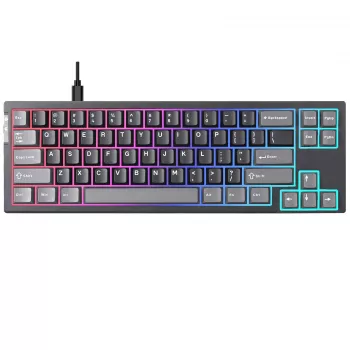
68-Key Hall Effect Rapid Trigger Wired RGB Keyboard
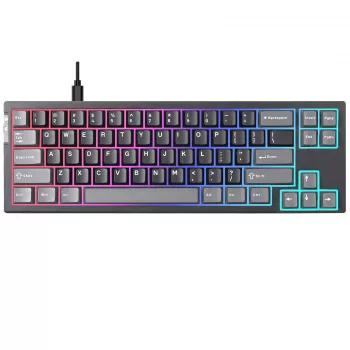
Rapid trigger speed in a compact 68-key layout
Fast inputs feel effortless when the keyboard keeps up with every micro-adjustment. Our Rapid Trigger 68-Key Hall Effect Wired Gaming Keyboard with RGB Backlight brings rapid trigger response, compact desk-friendly sizing, and vivid RGB lighting into one streamlined setup—built for quick strafes, clean resets, and a clutter-free battlestation.
If you’re dialing in movement timing, trying to keep your aim steadier with more mouse room, or you simply want a wired board that feels consistently responsive day after day, this Hall Effect build is designed around those priorities.
What this keyboard is built to do
- Deliver fast-feeling key resets for movement-heavy games where repeated taps and quick releases matter.
- Use Hall Effect sensing to register input based on magnetic travel rather than relying on traditional physical contact timing.
- Keep your desk open with a 68-key compact layout that frees up mouse space.
- Stay consistent with a wired connection for stable play sessions and a set-and-play routine.
- Add atmosphere with RGB backlighting for day-to-night setups and clean desk vibes.
Why Hall Effect + rapid trigger feels different in-game
Rapid trigger behavior is all about how quickly a key can “let go” and be ready to register your next press. In practical terms, that can make repeated directional taps and quick counter-strafes feel more immediate, especially when you’re doing constant start/stop movement instead of long holds.
Hall Effect sensing reads switch movement with a magnet-and-sensor approach, so actuation is tied to travel rather than a metal contact closing. Over time, that sensing method can help keep input behavior consistent because it isn’t dependent on the same kind of contact timing as traditional mechanical switches. If you’d like a simple background read on the underlying principle, the Hall effect overview is a solid starting point: https://en.wikipedia.org/wiki/Hall_effect.
Together, rapid trigger plus Hall Effect sensing is a strong match for players who want crisp stop-and-go movement without waiting on a conventional reset point. Outside of gaming, the same responsiveness can feel snappy for shortcuts, quick command sequences, and repetitive editing inputs.
Compact 68-key layout: more mouse room, fewer distractions
A 68-key footprint keeps core typing and gaming keys close, which helps reduce hand travel when you’re actively playing. The biggest day-to-day benefit is what it does for your mouse space: a smaller keyboard typically opens up room for wider sweeps—especially helpful if you prefer lower sensitivity for steadier aim.
Compact boards also fit more naturally into shared desks, dorm setups, and minimalist battlestations. If you never touch a numpad during play, a 68-key layout is often the “sweet spot” between a tiny travel board and a full-size keyboard that dominates the desk.
Wired connection for a set-and-play routine
Wired keyboards keep the routine simple: plug in, play, repeat. For many PC setups, wired input devices are designed to work through standard USB Human Interface Device behavior, which is why they’re commonly plug-and-play across typical desktops and laptops. If you want the technical reference, the USB-IF HID class documentation is a good overview: https://www.usb.org/document-library/device-class-definition-hid-111.
In a practical desk setup, wired also pairs nicely with cable routing—once you’ve got your cable path dialed in, the keyboard stays locked in place and ready for long sessions without charging breaks.
RGB backlighting that works for both focus and flair
RGB isn’t just for show—lighting can help keep key areas visible during late sessions while giving your setup a personalized look. When you’re in a focused match, calmer lighting modes can reduce visual noise; when you’re showcasing your desk or streaming, brighter effects can help tie the whole battlestation together.
Because this board stays compact, the RGB can act like a centerpiece without swallowing your entire workspace.
Quick comparison: what to expect from this 68-key Hall Effect build
Use this snapshot to confirm the overall fit—layout, connection type, sensing style, and lighting focus.
| Feature | What it means for your setup |
|---|---|
| 68-key compact layout | More mouse space and a cleaner footprint than full-size boards |
| Hall Effect switch sensing | Magnetic sensing designed for consistent input behavior over time |
| Rapid trigger response | Faster-feeling resets for repeated taps and quick direction changes |
| Wired connection | Simple plug-in reliability for long gaming sessions |
| RGB backlighting | Customizable lighting for visibility and style |
Who this keyboard suits best
Dialing in a comfortable setup
Make it the centerpiece of a streamlined desk
- Rapid Trigger 68-Key Hall Effect Wired Gaming Keyboard with RGB Backlight
- Heart Shaped Crystal Ceiling Light
- Elegant Casual Leather Tote Bag for Everyday Style
FAQ
What does rapid trigger change compared to a standard keyboard feel?
Rapid trigger emphasizes faster key reset behavior, so repeated presses and quick release/press cycles can feel more responsive—especially during quick strafes, counter-movement, and rapid tapping. The result is often a cleaner start/stop feel without waiting on a traditional reset point.
What is a Hall Effect keyboard switch?
A Hall Effect switch uses magnetic sensing to read movement along the switch travel rather than relying on an electrical contact closing at a fixed point. In everyday use, that can translate to consistent sensing behavior over time and a smooth, controlled response.
Is this keyboard compatible with most PCs for gaming?
As a wired keyboard, it’s generally plug-and-play with common desktop and laptop gaming setups. Once connected, you can typically jump straight into games without dealing with wireless pairing or battery management.












Leave a comment