-
Shop
- Adidas
- Advanced Technologies
- AI Skills Mastery 2026 Collection
- Best-Sellers
- Calvin Klein
- Car Accessories
- Confidence
- Dating & Social Skills
- Digital Resources
- AI & Technology
- AI Skills
- Beauty
- Budgeting & Saving
- Car Buying & Ownership
- Cozy Feast Collection
- Electronics & Technology
- Entrepreneurship & Business Growth
- Financial Education
- Financial Independence
- Financial Mindset & Psychology
- Goal Setting
- Hobbies
- Home Styling & Organization
- Kitchen & Recipes
- Leadership
- Mindset
- Online Business
- Parenting & Child Development
- Personal Style & Fashion
- Pet Lifestyle & Wellness
- Positive Thinking
- Sleep Improvement
- Stress Management & Relaxation
- Travel Planning
- Yoga & Fitness
- Yoga & Mind-Body Practices
- Education & Learning
- Family & Parenting
- Fashion
- Alexander McQueen
- Bags
- Bags & Wallets
- Balenciaga
- Belts
- Blazers
- Bottega Veneta
- Brunello Cucinelli
- Burberry
- Chanel
- Chloé
- Dior
- Dolce & Gabbana
- Dresses
- Etro
- Fendi
- Gucci
- Hats & Hair Accessories
- Hoodies & Sweatshirts
- Jacquemus
- Jewelry
- Jil Sander
- Keychains
- Kiton
- Luggage
- Miu Miu
- Off-White
- Prada
- Rick Owens
- Saint Laurent
- Socks & Tights
- Sweaters & Cardigans
- The Row
- Tom Ford
- Tops & Shirts
- Valentino
- Valentino Garavani
- Versace
- Vivienne Westwood
- Watches
- Furniture
- Gadgets
- Health & Beauty
- Health & Wellness
- Home & Garden
- Kids & Babies
- Kitchen
- Lighting
- Patio, Lawn & Garden
- Personal Growth
- Pet Care
- Pet Supplies
- Pets
- Shoes
- Smart Home Living Guides
- Sport & Outdoors
- Stress Relief & Relaxation
- TikTok Growth & Monetization Mastery
- Travel
- Travel & Adventure
- Wealth
- Wellness
- YouTube Shorts Best-Sellers
- Popular
- Best deals
AI Outfit Ideas Made Easy: 60-Second Style Checklist
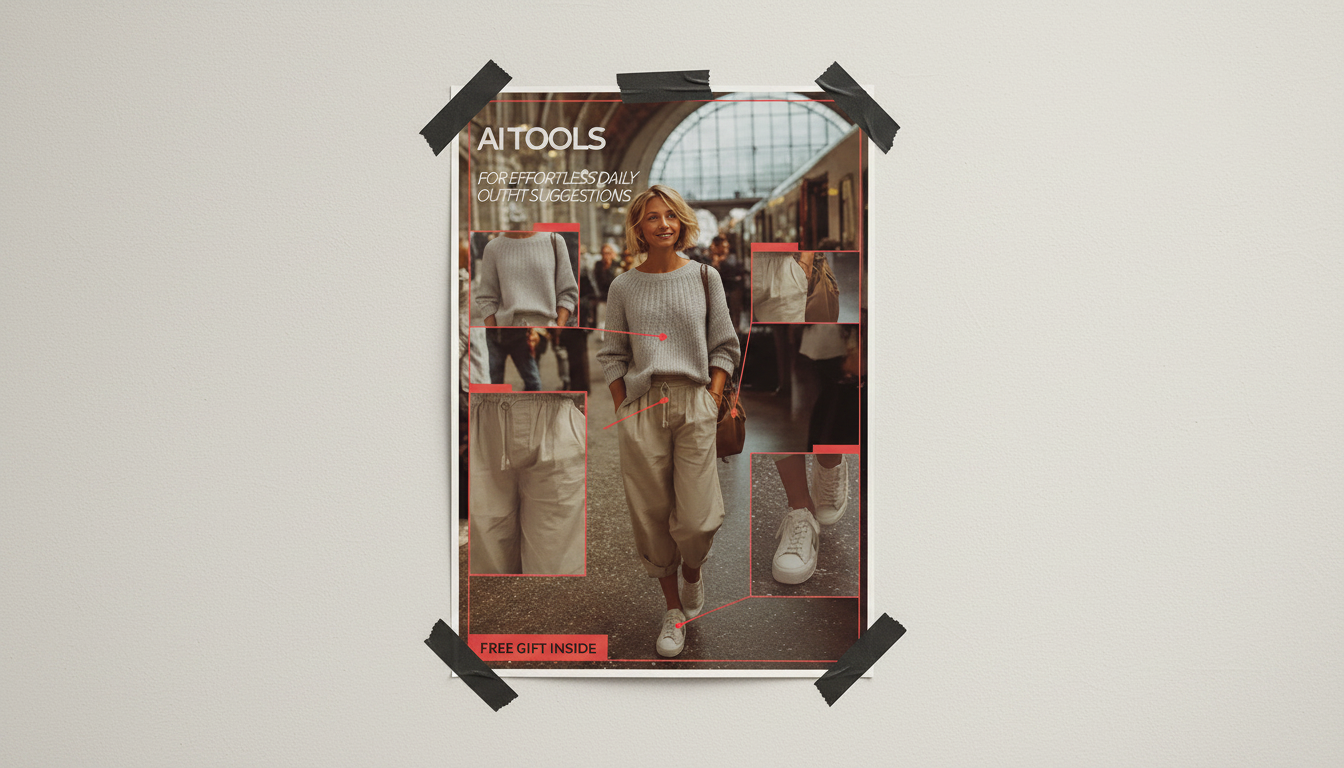
Effortless Daily Outfit Suggestions with AI: A Smart Style Checklist
Daily outfit decisions get easier when a simple checklist meets AI-powered suggestions. The goal is a repeatable routine that works with the closet that already exists, fits the day’s schedule, and stays comfortable for weather, movement, and confidence—without overthinking. When the “what should I wear?” question is answered the same way every morning (quick inputs, clear constraints, and a short list of options), getting dressed becomes a small win instead of a daily time sink.
What AI Outfit Suggestion Tools Actually Do
AI outfit tools don’t magically create a new wardrobe; they remix what you already own (or what you tell the tool you own) into combinations you’re likely to wear. Used well, they function like a personal styling assistant with a strong memory.
- Turn a few inputs (weather, dress code, mood, colors, occasion) into ready-to-wear combinations.
- Reduce decision fatigue by narrowing options to a short list rather than scanning the full closet.
- Spot gaps and overbuy patterns by tracking what gets worn vs. what sits unused.
- Support styling consistency: silhouettes, color palettes, and outfit formulas that repeat well.
- Work best when paired with a quick daily checklist and a realistic inventory of what’s available.
If you want a structured, plug-and-play way to get started, AI Tools for Effortless Daily Outfit Suggestions – Smart Style Checklist is a simple add-on that helps turn “random ideas” into a routine you can repeat.
Set Up in 15 Minutes: Inputs That Improve Suggestions
The fastest way to improve AI suggestions is to give the tool fewer, better inputs—not a messy data dump. Aim for coverage (tops, bottoms, layers, shoes) before variety.
- Closet snapshot: add 20–40 core items first (tops, bottoms, layers, shoes) before adding everything.
- Lifestyle rules: typical dress codes (office casual, creative, formal, sporty) and comfort needs (commute, walking, temperature sensitivity).
- Fit and feel notes: preferred rises, sleeve lengths, necklines, fabrics, and any “no-go” items.
- Color lane: pick 2–3 base neutrals and 2–4 accent colors to simplify mixing.
- Weather integration: use a reliable forecast and include wind/precipitation and indoor AC as constraints (the National Weather Service is a dependable place to start).
A helpful setup trick: add notes like “only with a belt,” “needs a strapless bra,” or “no long sleeves today.” Those micro-constraints prevent outfits that look great on-screen but feel wrong by 10 a.m.
The Smart Style Checklist (Daily, 60 Seconds)
Use this checklist as a quick filter before you accept any AI suggestion. It keeps the outfits realistic for your day and makes the tool feel surprisingly accurate.
- Agenda: meetings, errands, workout, dinner—rank by formality and time outdoors.
- Weather: temperature range, rain/snow, wind, and indoor climate.
- Base layer: start with one hero piece (pants, dress, or top) that feels effortless today.
- Balance: volume vs. slim (e.g., wide-leg + fitted top; oversized top + straight pants).
- Color: keep to a 2–3 color rule for quick harmony; add one intentional accent.
- Footwear: prioritize comfort and terrain; match formality first, then color.
- Layering: jacket/cardigan/coat that works both outside and indoors.
- Finish: one accessory decision (bag, belt, jewelry) and one grooming note (hair, fragrance, makeup).
Quick checklist for better AI outfit results
| Checklist step | What to decide | AI-friendly input example |
|---|---|---|
| Agenda | Most formal moment of the day | “Client call + casual dinner” |
| Weather | Range + precipitation + wind | “55–68°F, light rain, windy” |
| Comfort | Movement + fabrics | “Walk 8k steps, no itchy knits” |
| Color lane | Neutrals + one accent | “Black/cream + olive” |
| Silhouette | One fitted + one relaxed | “Relaxed trouser + fitted tee” |
| Footwear | Terrain + time on feet | “Sneakers or low boots” |
| Layer | Indoor/outdoor balance | “Light trench, thin knit” |
| Finish | One statement item | “Gold hoops” |
Outfit Formulas AI Can Remix All Week
Outfit formulas are the shortcut that makes AI suggestions feel cohesive instead of random. Think of them as templates: once you know the shape of the outfit, AI can swap colors, layers, and shoes based on the forecast and your calendar.
- Formula 1: Straight pants + fitted knit + structured layer + simple sneakers/loafers.
- Formula 2: Midi skirt + tucked tee + cropped jacket + ankle boots.
- Formula 3: Dress + belt (optional) + cardigan/blazer + flats.
- Formula 4: Dark denim + crisp shirt + lightweight coat + minimal accessories.
- Formula 5: Monochrome base + contrasting shoe or bag for a quick “pulled-together” finish.
To keep combos looking intentional, choose a consistent “color lane.” If you want a structured way to think about color relationships, Pantone is a useful reference for color families and inspiration.
Common Pitfalls and Fast Fixes
Privacy, Photos, and Data Controls
For a practical overview of safer habits online, the Federal Trade Commission’s privacy guidance is a solid reference.
A Simple Add-On That Makes Outfits Feel Finished
If you want a polished option that works across casual-to-smart outfits, Elegant Casual Leather Tote Bag for Everyday Style is an easy “set it and forget it” finishing piece.
FAQ
How many items need to be added before AI outfit suggestions get useful?
About 20–40 core pieces is usually enough to get genuinely helpful suggestions, as long as you include tops, bottoms, shoes, and at least a couple of layers. Start with what you wear weekly, then add seasonal essentials so the tool can cover different temperatures and dress codes.
Do AI outfit tools work if the closet is mostly basics?
Yes—basics are ideal because they remix easily and make outfit formulas more consistent. To avoid everything feeling the same, add a few accents (one standout layer, a go-to shoe, and 2–3 accessories) so the tool has “finishers” to rotate.
How can outfit photos be uploaded without sharing personal information?
Crop images to the garment only, and avoid faces, badges, mail labels, or anything identifying in the background. Review app permissions and use tools with clear export/delete controls so you can remove photos later if needed.
Recommended for you

Crime London Men’s Sneakers: Fit, Style & Care Guide
Jul 28, 2026










Leave a comment