-
Shop
- Adidas
- Advanced Technologies
- AI Skills Mastery 2026 Collection
- Best-Sellers
- Calvin Klein
- Car Accessories
- Confidence
- Dating & Social Skills
- Digital Resources
- AI & Technology
- AI Skills
- Beauty
- Budgeting & Saving
- Car Buying & Ownership
- Cozy Feast Collection
- Electronics & Technology
- Entrepreneurship & Business Growth
- Financial Education
- Financial Independence
- Financial Mindset & Psychology
- Goal Setting
- Hobbies
- Home Styling & Organization
- Kitchen & Recipes
- Leadership
- Mindset
- Online Business
- Parenting & Child Development
- Personal Style & Fashion
- Pet Lifestyle & Wellness
- Positive Thinking
- Sleep Improvement
- Stress Management & Relaxation
- Travel Planning
- Yoga & Fitness
- Yoga & Mind-Body Practices
- Education & Learning
- Family & Parenting
- Fashion
- Alexander McQueen
- Bags
- Bags & Wallets
- Balenciaga
- Belts
- Blazers
- Bottega Veneta
- Brunello Cucinelli
- Burberry
- Chanel
- Chloé
- Dior
- Dolce & Gabbana
- Dresses
- Etro
- Fendi
- Gucci
- Hats & Hair Accessories
- Hoodies & Sweatshirts
- Jacquemus
- Jewelry
- Jil Sander
- Keychains
- Kiton
- Luggage
- Miu Miu
- Off-White
- Prada
- Rick Owens
- Saint Laurent
- Socks & Tights
- Sweaters & Cardigans
- The Row
- Tom Ford
- Tops & Shirts
- Valentino
- Valentino Garavani
- Versace
- Vivienne Westwood
- Watches
- Furniture
- Gadgets
- Health & Beauty
- Health & Wellness
- Home & Garden
- Kids & Babies
- Kitchen
- Lighting
- Patio, Lawn & Garden
- Personal Growth
- Pet Care
- Pet Supplies
- Pets
- Shoes
- Smart Home Living Guides
- Sport & Outdoors
- Stress Relief & Relaxation
- TikTok Growth & Monetization Mastery
- Travel
- Travel & Adventure
- Wealth
- Wellness
- YouTube Shorts Best-Sellers
- Popular
- Best deals
15W Wireless Charger Stand with Clock: What to Know
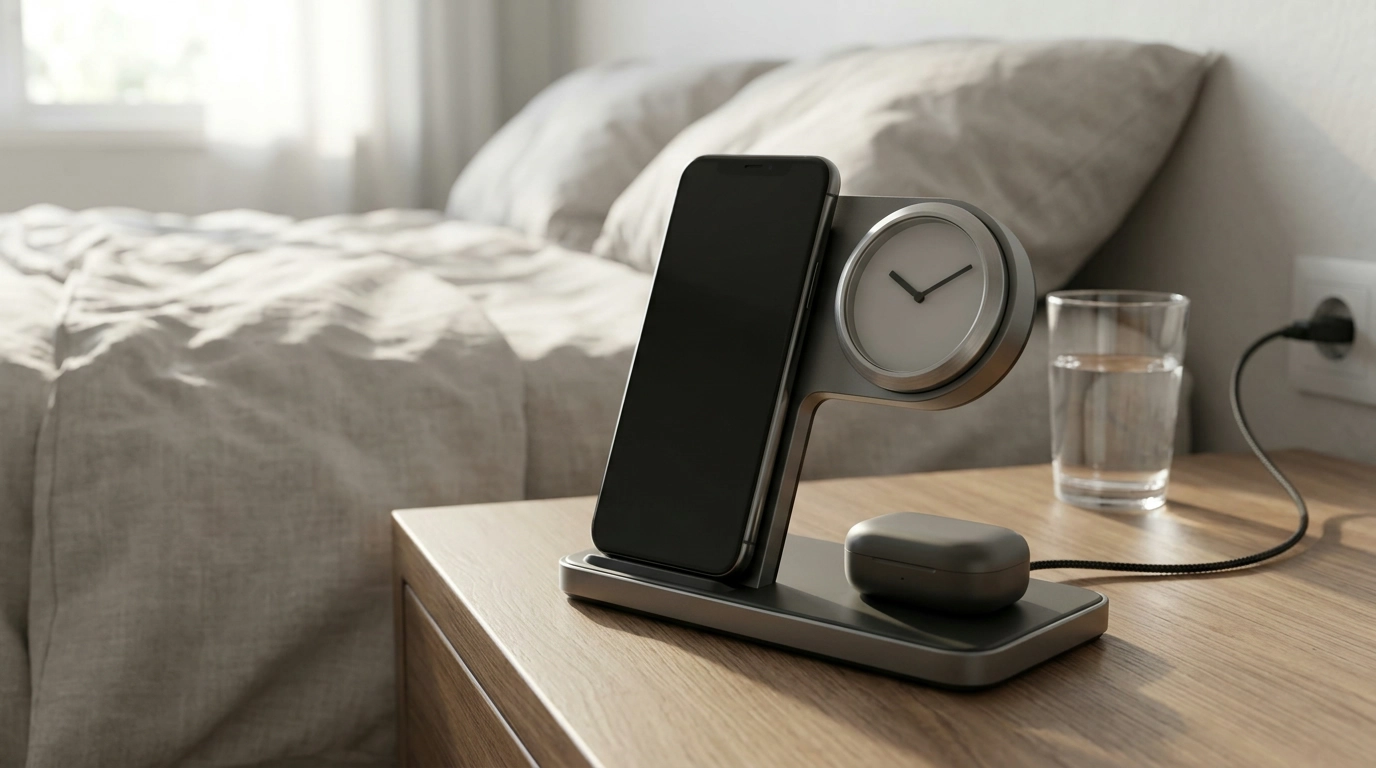
A dedicated charging spot can make it easier to keep your everyday devices in one place. Our 15W 3-in-1 wireless charger stand with clock brings a phone, compatible earbuds, and a time reference together on a desk or bedside table. Before choosing one, take a moment to confirm that your devices and power supply meet its requirements.
A charging station for everyday routines
A bedside table is a convenient place to put your phone down at the end of the day. A desk can work just as well if you prefer to keep your devices nearby while you work. In either spot, a dedicated charger gives you a consistent place to return your phone and earbuds instead of leaving them in different corners of the room.
Our 15W 3-in-1 Wireless Charger Stand with Clock is designed for use with compatible iPhone, AirPods, and Samsung devices. Compatibility varies by model, so the names alone don’t mean every device in those ranges will work with the stand.
The built-in clock adds a practical time reference to your charging area. You can glance at the stand for the time while your compatible devices are in their designated positions. That makes it useful as more than a place to set down your phone.
What to check before choosing
Start with the exact model of your phone. Wireless charging support varies across iPhone and Samsung models, and a device needs the appropriate wireless charging capability to use the stand. If you use AirPods, check the case as well: wireless charging depends on the case, not just the earbuds inside it.
Also confirm which of your devices can charge together on the stand. A 3-in-1 description is a useful starting point, but it doesn’t establish that every combination of phone and accessories is supported. Review the product instructions and specifications for the devices you plan to use.
The stated 15W figure is the charger’s rating, not a promise that every device will charge at 15W. Actual charging speed depends on device compatibility and the power supply. Check the required adapter specifications and what accessories are included before you buy, so you know whether you need a separate power adapter.
Compatibility checks at a glance
| Item | What to check |
|---|---|
| iPhone or Samsung phone | Wireless charging support for the exact model |
| AirPods | Whether the charging case supports wireless charging |
| Power supply | Required adapter specifications and what is included |
| Charging speed | Supported output for each device and its power supply |
For more background, Apple explains how to wirelessly charge an iPhone, including device placement and charging considerations. The Wireless Power Consortium’s guide to Qi also offers an overview of wireless charging technology.
Set up a practical charging spot
Choose a stable, accessible surface near a suitable power outlet. Leave enough room to place and remove your devices comfortably, and make sure the power cable can reach without being pulled tight. A spot you already use every day is more likely to become a convenient part of your routine.
Connect the stand using the required power supply, then position each compatible device according to the product instructions. Wireless charging depends on placement, so take a moment to make sure each device is sitting where it should.
Check that charging begins. If a device does not charge, reposition it and verify that the power connection is secure. Check the device’s case and the charger instructions as well; a case or an object between the device and the charging surface can interfere with charging. If the issue continues, consult the instructions for your specific devices and power adapter.
Make it part of your daily routine
Once your spot is set up, you can place compatible devices on the stand when you settle in for the night or start work at your desk. A consistent routine makes it easier to know where your devices are when you need them again.
Follow the device and charger instructions for safe use, and keep the charging surface clear of metal objects. It’s also worth keeping the surrounding area accessible so you can remove a device or disconnect the power supply when needed.
If you carry your everyday essentials between home and work, our Elegant Casual Leather Tote Bag for Everyday Style is another option to explore alongside your home charging setup. For the stand itself, our team recommends confirming your exact devices, supported combinations, and adapter requirements before ordering.
Ready to simplify your charging spot? Explore the charger and make sure it suits the devices you use at home.
Before choosing, compare the product details with your daily routine, available space, care needs, and preferred setup. The strongest option is usually the one that fits the intended use clearly and remains simple to clean, store, and check before repeat use.
FAQ
Will this charger work with every iPhone and Samsung phone?
Not necessarily. Check that your exact phone model supports wireless charging and confirm compatibility with the stand before buying.
Can AirPods charge on the stand?
They may be able to if the AirPods case supports wireless charging. Confirm that your case is compatible with the stand before buying.
Will every device charge at 15W?
No. The stated 15W rating does not guarantee that speed for every device; charging speed depends on device compatibility and the power supply.














Leave a comment